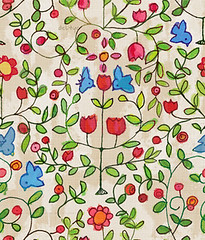
Now you know how to make your own patterns ( a tutorial here). But still, they have this peculiar digital look and you would be very pleased to add a little texture to give them more reality. I'm going to show you today 2 very quick ways to age your patterns.
1.First, scan a sheet of paper. Colors are better, a lot of grain is welcome. Cut a square the exact size of your pattern ( here 256x256 pixels). Or half, third if you want to repeat it. I make all my patterns in a restricted array of sizes to be able to mix and match (512x512, 256x512, etc).

2. Apply the filter>offset with (here ) an offset of 128 pixels. A seam will appear in the middle of your picture. Make it invisible with the stamp tool or the healing brush tool to create a seamless pattern. Then you can make the grain more visible with one of the Sharpen filters. 3. Aging with no change of the original picture colors. Desaturate your picture ( ⌘+shift + U) 4. copy and paste this texture in a new layer over your pattern ( here my bird pattern). Set the layer in overlay mode in the layer palette. Change the transparency of the layer to your taste, et voila! A bird pattern on paper. Here is another solution: 3. Aging and yellowing the picture. Prepare your paper texture as in (1) and (2). Then using Image>adjustments>curves and Image>adjustments>hue saturation, change your texture to a pale yellow one with a lot of grain.  can you see the difference with the precedent picture?
Then apply the filter>Other>High Pass. Set the radius so the picture keeps only the grain. Too large of a radius will create a seam. This filter keeps the grain and equalize the picture to a medium gray.


4.Copy and paste this texture in a new layer over your pattern ( here my bird pattern). Set the layer in multiply mode in the layer palette. Change the transparency of the layer to your taste, et voila! A bird pattern on paper, with just enough of yellow to make it look vintage.

Comme d'habitude, j'ai besoin d'aide a la traduction que vous trouverez ici:
Je patine mes textures